
The customer's order is incomplete. Within seconds, an automatic reply arrives: “Thank you for contacting us. Your satisfaction is important to us.”
So far, so good. Then the system asks for the order number the customer has already provided. The next message promises an update. Two days later, the customer is still waiting—and starts the story again with a person.
The inbox looks busy. But who owns the problem?

This is an illustrative example, not an Outrise client case. It shows a familiar problem: an automated system can respond quickly while the actual issue stands still.
Good customer service automation should move the work forward, not simply make the first message faster.
Start with the outcome, not the tool
Before choosing a chatbot or building a workflow, write down what a successful outcome looks like. For an incomplete order, it might be: the right person receives the details, checks what happened, and tells the customer what will happen next.
Automation can capture the order number, identify the relevant team and make sure the enquiry is recorded. A person may still need to decide whether to replace an item, investigate a repeated problem or handle an unusual request.
The handoff matters. If the team cannot see the customer’s earlier messages, the automation has created a second conversation rather than a smoother first one.
Ask three questions about each step:
- Does it collect information someone will actually use?
- Does the next person know what to do with it?
- Can the customer reach someone when the usual path fails?
Decide where human judgement matters
Not every message needs a manager. A delivery-status update or acknowledgement can often be handled with a clear, approved response. But decisions become harder when the details are incomplete, the customer is distressed or the answer could commit the business to a refund, deadline or exception.
Set an escalation route for those cases. Give the reviewer the conversation, relevant records and enough authority to resolve the issue or pass it to someone who can. A notification alone is not ownership: someone needs to be responsible for acting on it.
AI can help organise a case or suggest a draft, but a fluent answer is not proof that its facts are correct. The UK Information Commissioner’s Office describes automation bias: people may place too much trust in an AI recommendation. Its guidance on human review recommends giving reviewers the time, context and authority to challenge an output. ICO, Human review, accessed 27 October 2026.
A useful human review is a decision, not a rubber stamp.
The case for more automation
There is a reasonable objection: if every enquiry goes to a person, the queue grows and customers wait longer. That is especially frustrating when someone only needs a routine answer.
The answer is not to remove automation. It is to use it for repeatable work with clear boundaries. A straightforward acknowledgement can tell the customer their request was received and explain the next step. A reminder can alert the owner when a case has not moved. The exception can go to a person, along with the information already collected.
Those boundaries will change as the team learns. A process that works for ten enquiries may need different checks when volume grows. NIST’s research on deployed AI systems discusses the practical challenges of monitoring systems after launch; a launch is the beginning of observation, not the end of it. NIST, Challenges to the monitoring of deployed AI systems, 2026.
Build a small handoff before a large chatbot
Choose one common enquiry and map its path from arrival to resolution. For example:
Enquiry received → details captured → owner assigned → action taken → customer updated → case closed.
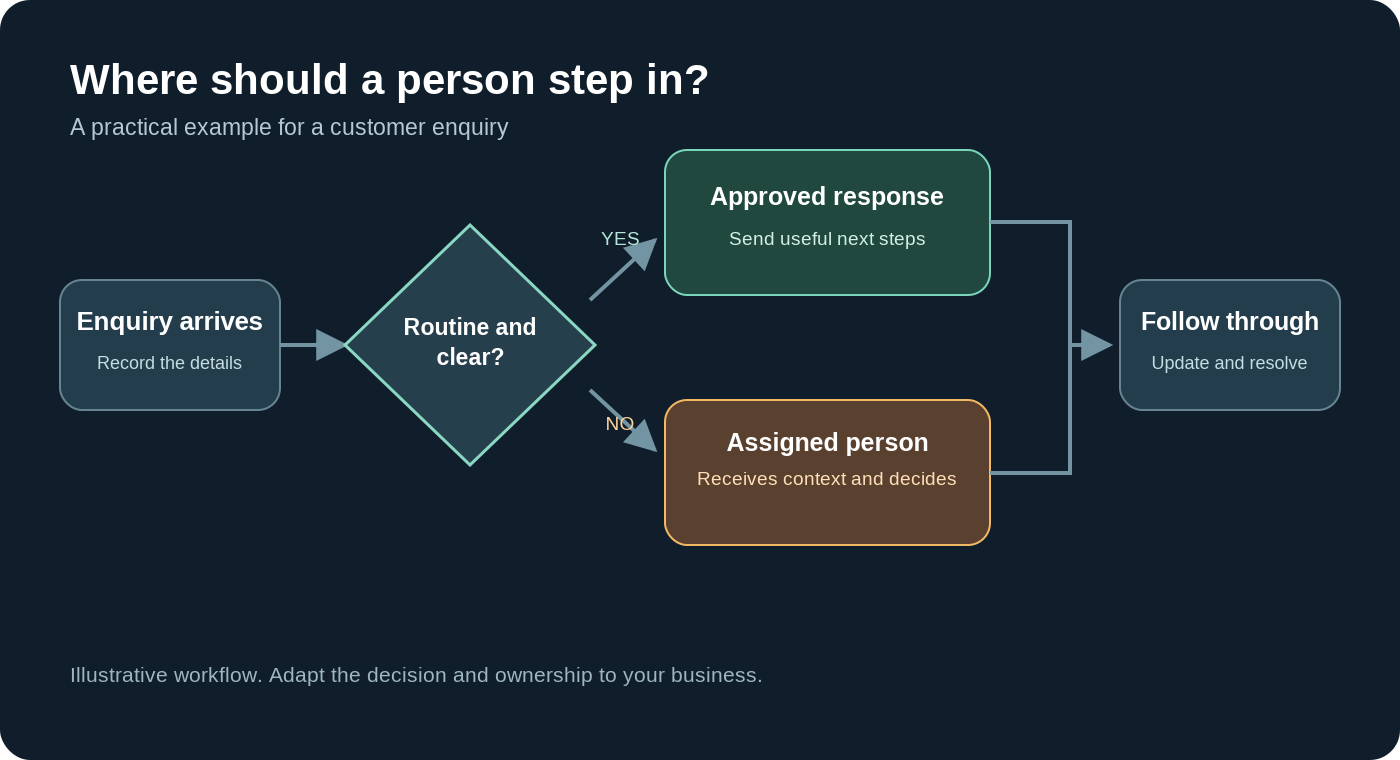
Example workflow: routes, owners and review steps should be adapted to your business.
That sequence is a conceptual example. Your business may need more steps or a different route. The important point is that each stage has an owner and a way to tell whether work is waiting.
Test the process with fictional enquiries before using it with real customers. Include an easy request, missing information and an exception. If a workflow cannot complete a step, make sure it flags the issue instead of quietly stopping. An error workflow can help alert an operator, but it has to be configured for the business and checked regularly. n8n, Error handling documentation, accessed 27 October 2026.
A practical checklist
Before automating your next customer process, check that you have:
- A clear outcome for the customer and the business.
- One named owner for enquiries that need a decision.
- A way to carry the conversation and relevant details into the handoff.
- A route for unusual, unclear or sensitive requests.
- A message that explains the next step without promising an unconfirmed outcome.
- A way to spot stalled cases and correct mistakes.
- A regular review of whether customers are getting their issues resolved.
Try this today: Pick one enquiry your team has received more than once. Trace it from the first message to the final answer. Note every point where the customer repeats information, the case waits without an owner, or the next action is unclear. Fix one handoff before adding another tool.
Start with a small process your team understands. Measure what happens, listen to the people handling exceptions, and improve it before adding another layer. The goal is a service that feels easy for the customer and manageable for the people behind it.
Want to improve a customer handoff? Tell Outrise where enquiries get stuck, and we can discuss a practical, scoped next step.
JOIN THE CONVERSATION
Where does your customer handoff get stuck?
Share a practical question or experience. Comments are reviewed before they appear.